Many thanks to all of you for your donations and your amazing support.
Advertising
We’re using Google Adsense here on the blog and on the forums.
It came to our attention that the advertising platform had become much more intrusive than before.
We will take action to reduce the number and placement of ads on our website or failing that to remove them altogether.
I’m sorry for the inconvenience.
Hexchat
Patrick Griffis (aka “Tingping”), known for his work on many open-source projects (GNOME, Flatpak, Gnome-MPV, Meson, etc.), announced the end of the Hexchat project:
I’ll take the opportunity to link to Patrick’s blog and commit for those of you who want to send him a donation or just thank him for his work:
In Linux Mint, Hexchat has been the default IRC client since 2014.
Before that Linux Mint shipped with Xchat, which Hexchat was based on. I can’t remember the last time we shipped without an IRC client, if we ever did.
Going forward, since Hexchat is discontinued, we need to either remove it from the default selection or replace it with another application.
Hexchat has been rock solid but we’ve been thinking about replacing it for a couple of years.
We didn’t know it was going to be discontinued but we faced two growing issues with it.
It’s one of the very few remaining applications in our software selection which doesn’t scale on an HiDPI screen. It would have needed to migrate to GTK3. It was a lot of work for Hexchat and that never happened.
It’s also is a full-featured IRC client. IRC? Yes IRC. The open protocol which divides our community.
IRC
Some of you think IRC is extremely important, some of you think it’s archaic and some of you have never heard of it.
In the 90’s IRC was popular on UNIX terminals way before we had Linux, Windows 3.1 or the Internet at home. Just like email or the Web, it goes way back and it doesn’t belong to anybody. It’s an open protocol. Anyone can make an IRC server or an IRC client.
Discord is modern and easy to use but there’s only one Discord implementation. IRC is an open protocol. This is important because it creates tensions which we need to address.
Die-hard IRC users are very proud of this and look down on closed alternatives, and shall I say, rightly so.
Younger users which sometimes have been using Discord even before they moved to Linux expect chat programs to work a certain way and can also look down on IRC. And again, I’d be tempted to say rightly so.
IRC clients are made for IRC users. Users are expected to know what IRC is and how to use it.
People often wonder what Hexchat is when they see it in the menu and don’t understand what happens when they launch it. When they land in the support channel and ask “What is this?” they’re not always welcomed properly.
Jargonaut
There are IRC clients written in GTK3 which are HiDPI compatible, but replacing Hexchat with one of them doesn’t really solve our problem.
What Linux Mint needs, first and foremost, is a place for people to ask questions to other users.
An IRC client can provide that but it’s not dedicated to doing that. So with that in mind we started working on a new app called Jargonaut.
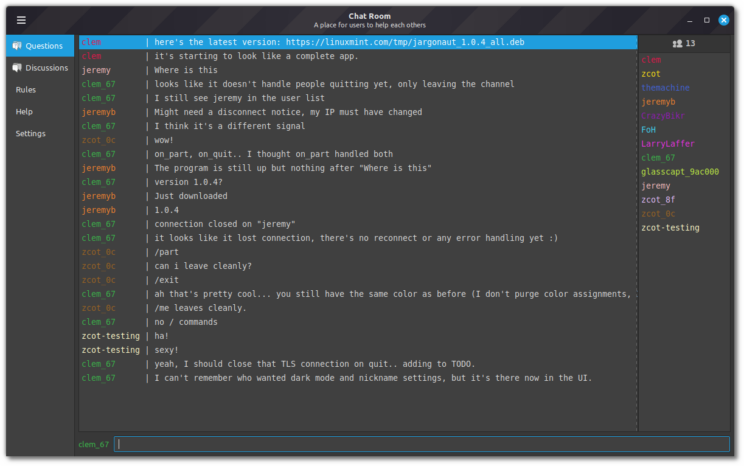
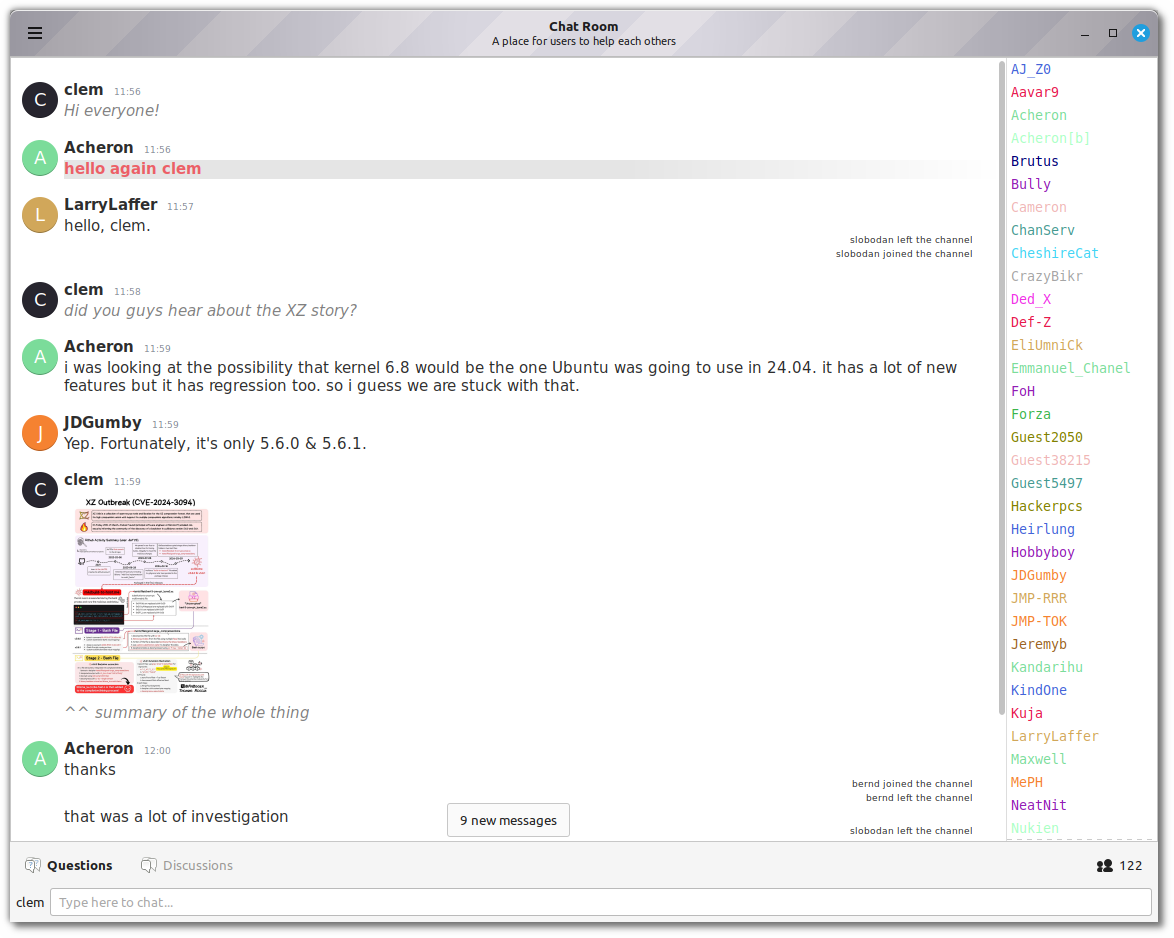
Jargonaut will be a dedicated app. It will do just that and do it better.
Although it uses the IRC, it won’t be developed as an IRC client. It will support pastebin/imgur via DND, uploading your system specifications, troubleshooting and many features which have nothing to do with IRC. Yet you won’t be able to join channels or perform common IRC commands.
Hexchat was a great IRC client which helped us make a relatively good support chat room. We’re hoping Jargonaut will help us make this chat room even better and much easier to use.
If you want to follow our work on this new app visit https://github.com/linuxmint/jargonaut.
Jargonaut is an XAPP so it’s designed to work on all Linux distributions and all desktop environments.
Note: It’s only a few days old so it’s currently using #minttest on irc.spotchat.org. It will eventually move to #jargonaut and a different server. Linux distributions will be able to set custom defaults via gsettings overrides. In Linux Mint we’re planning to make it connect to #linuxmint-help and #linuxmint-chat on Spotchat.
Sponsorships:
Linux Mint is proudly sponsored by:
Gold Sponsors:

Silver Sponsors:

 |
Bronze Sponsors:








 |
Donations in January:
A total of $18,326 were raised thanks to the generous contributions of 647 donors:
 $300 (2nd donation), Kaori E.
$250 (2nd donation), James M.
 $216 (2nd donation), Ralph J.
 $216, Jan D.
$200, anonymous
$162 (4th donation), Wolfgang S.
$150, Christian T.
 $108 (12th donation), Jack W. S. aka “kundalinijack”
$108 (3rd donation), Christof S.
 $108 (2nd donation), E. V. S. .
 $108 (2nd donation), Andrei M.
 $108, Anthony H.
$108, Bas Vermulst aka “Bazz0847”
$108, Carsten F.
 $108, Daniil S.
$108, Friedrich D.
$108, Marcel G. aka “spozzi99”
 $108, Michael K.
 $108, Romain Derocle
$108, Thomas L.
$107, Paul E.
 $101 (2nd donation), D & M Cabot Pty Ltd
 $100 (34th donation), Wolfgang P.
$100 (10th donation), John M.
$100 (8th donation), Jean P. R.
$100 (4th donation), David H.
$100 (2nd donation), Anthony G.
$100 (2nd donation), Clive Newstead
$100 (2nd donation), David J S.
$100 (2nd donation), Eric J.
 $100 (2nd donation), Faisal Yousuf
$100 (2nd donation), Jeffrey L.
$100,
 $100, Aleksandr G.
$100, Robert G.
$100, Steven E.
 $100, Vojtech S.
 $72, Miguel R.
$70 (4th donation), Mathieu C.
$70, Andrew Lamond
$65, bnther
$60 (11th donation), James L.
$60, Valued C.
$54 (16th donation), Bernard H.
 $54 (10th donation), Roland H.
$54 (7th donation), Peter G.
 $54 (6th donation), Eugenio B. aka “OdyArt”
$54 (6th donation), Giovanni D. S. aka “ChibiOS”
$54 (6th donation), Jean-luc W.
$54 (5th donation), Dominique P.
$54 (5th donation), Rosanna & Alex
$54 (5th donation), Thomas R.
$54 (4th donation), Eduard K.
 $54 (3rd donation), @tiagoameller
$54 (3rd donation), AllanR
$54 (3rd donation), Guenter B.
$54 (3rd donation), John S.
$54 (3rd donation), Karl-heinz R.
$54 (3rd donation), Konrad S.
$54 (3rd donation), Peter G.
$54 (3rd donation), Rob B.
 $54 (2nd donation), Albert-jozef P.
 $54 (2nd donation), Alejandro M. A.
$54 (2nd donation), Christian G.
$54 (2nd donation), Karl G.
$54 (2nd donation), Leonhard G.
$54 (2nd donation), Martin K.
$54 (2nd donation), Roland D.J.
$54 (2nd donation), Siegfried S.
$54 (2nd donation), Wolfgang U.
$54, Alfred G.
$54, Andreas K.
$54, Christian P.
$54, Dieter P.
 $54, Domagoj Ž.
$54, Erwin T.
$54, Gabriel A.
$54, Geoff P.
$54, Isa T.
$54, Joakim D.
$54, Jürgen M.
$54, Manfred H.
$54, Marc R.
$54, Martin K. aka “heavy-e”
 $54, Mika M.
$54, Norbert T.
$54, Rene L.
$54, Stefan A.
$54, Til M.
$54, Trevor K.
$54, Winfried H.
$53 (5th donation), John Mc
$50 (80th donation), Anthony C. aka “ciak”
$50 (59th donation), Michael R.
$50 (22nd donation), George H.
$50 (14th donation), An L.
 $50 (9th donation), Nasser Bader aka “VIRUS”
$50 (8th donation), Kyle S.
$50 (8th donation), Marty L.
$50 (7th donation), Don P.
$50 (7th donation), Michael C.
$50 (6th donation), L. H. .
$50 (6th donation), David H. W.
$50 (6th donation), David V.
$50 (6th donation), Dean R.
$50 (6th donation), Derek S. aka “Corky357”
$50 (6th donation), Harry Fine
$50 (5th donation), Gerard S.
$50 (5th donation), Herman B.
$50 (4th donation), Salomon G.
$50 (4th donation), Stuart C. D.
$50 (3rd donation), Mark K.
$50 (3rd donation), Media Dynamics, Inc.
$50 (3rd donation), Olivia C.
$50 (3rd donation), Peter C.
$50 (3rd donation), Stephen C.
$50 (2nd donation), Darryl E.
$50 (2nd donation), Edmund B.
$50 (2nd donation), Ehrhardt G.
$50 (2nd donation), Elizabeth L.
 $50 (2nd donation), German Genaro R.
$50 (2nd donation), Tony Whelan
$50, Alford F.
$50, Andrew G.
$50, Arestor B.
$50, Chris M.
$50, David R S.
$50, dogbyte
$50, Gordon B.
$50, James B.
$50, James R.
$50, Jeffrey J.
$50, Jesse B.
$50, lpmdesigns
$50, Michael L.
$50, Raymond Young
$50, Robert M.
$50, Robert M.
$50, Robert W.
$50, SSR
$50, Thierry S.
 $50, Thomas B.
$50, Timothy O.
$50, torstenvl
$50, W9OQI aka “Chip”
$44 (6th donation), Benjamin W.
$44 (2nd donation), Jorge Arturo V.
$43 (10th donation), Pavel B.
$40 (45th donation), Stefan M. H.
$40 (14th donation), Real F.
 $40 (9th donation), Pablo L. aka “LAFO”
$40 (7th donation), Darin W.
$39 (2nd donation), René Z.
$38 (7th donation), Clifford H.
$36, Mark C.
$35 (6th donation), Ken S. aka “knucklehead”
$35 (2nd donation), Rodney M.
$32 (12th donation), Marc S.
$32 (9th donation), Tom S.
$32 (8th donation), Bobcam Computer Solutions aka “Rob”
$32 (6th donation), Wolfgang S.
$32 (5th donation), Gerardo A. M.
$32 (5th donation), Ralf W.
$32 (4th donation), Jürgen H.
$32 (4th donation), Luc F.
$32 (2nd donation), A R.
$32 (2nd donation), Fabrice D.
$32, adios aka “windows”
$32, Dominique Z.
$32, Florian M.
$30 (5th donation), Daniel T.
$30, David R.
$30, Jinnah M.
$30, John W.
$27 (23rd donation), Joachim M.
$27 (21st donation), John K. aka “jbrucek”
 $27 (7th donation), Stoyan
$27 (4th donation), Wouter W.
$27, Marc B.
$27, Sabine M.
 $26, Óscar R.
$25 (35th donation), Linux Mint Sverige
$25 (12th donation), Andrew Currie
$25 (9th donation), Thomas C.
$25 (9th donation), Timothy C.
$25 (5th donation), Chuck G.
$25 (4th donation), Patrick M.
$25 (3rd donation), Myron J.
$25 (2nd donation), Chaz C.
$25 (2nd donation), Logan C.
$25 (2nd donation), macglen
$25 (2nd donation), Maxime R.
$25, Al B.
$25, Eric C.
$25, Steve
$24, Joachim N.
$24, Natashe F.
$22 (44th donation), Peter E.
$22 (20th donation), Nigel B.
$22 (15th donation), Pentti T.
$22 (14th donation), Peter R.
$22 (10th donation), Gabriele Bandini aka “GiBi Gab”
$22 (10th donation), Stefan W.
$22 (8th donation), Eduard L.
$22 (8th donation), Florian G.
$22 (8th donation), Francis N.
$22 (7th donation), Alexander H.
$22 (7th donation), Cornelis V.
$22 (7th donation), Divoto
 $22 (7th donation), Marek S. [LMDE SUPPORTER]
$22 (6th donation), Henrik Simonsen
$22 (6th donation), Rolf-Jürgen G.
$22 (6th donation), Thomas W.
$22 (5th donation), Gareth L.
$22 (5th donation), Giovanni M. aka “gmaggior”
$22 (5th donation), Martin O.
$22 (5th donation), Michael K.
$22 (5th donation), Rüdiger A.
$22 (5th donation), Soren ONeill
 $22 (5th donation), Waldemar P. aka “valldek”
$22 (4th donation), Andreas Agoumis aka “IntCon”
$22 (4th donation), Andreas Z.
$22 (4th donation), Jan S.
$22 (4th donation), Maurizio Giacobbe aka “maurizioweb”
$22 (4th donation), Mike E.
$22 (3rd donation), Andrew W.
$22 (3rd donation), Bernard G.
$22 (3rd donation), Christian S.
$22 (3rd donation), Daniel K.
$22 (3rd donation), Francis D.
$22 (3rd donation), Gerhard K.
$22 (3rd donation), Henk V.
$22 (3rd donation), Jakub G.
$22 (3rd donation), Manfred H.
$22 (3rd donation), Michel C.
$22 (3rd donation), Michel W.
$22 (3rd donation), Nabil aka “Billy”
$22 (3rd donation), Richard H.
$22 (3rd donation), Sophie K.
$22 (3rd donation), Tobias B.
$22 (2nd donation), André K.
$22 (2nd donation), Branislav P.
$22 (2nd donation), Gerard Gerritsen.
$22 (2nd donation), Heikki L.
$22 (2nd donation), Herbert G.
$22 (2nd donation), Ines R.
$22 (2nd donation), Jason T.
$22 (2nd donation), John C.
$22 (2nd donation), Ludwig K.
$22 (2nd donation), Matthew D.
$22 (2nd donation), Michael P.
$22 (2nd donation), Pablo L.
$22 (2nd donation), Reinhold K.
$22 (2nd donation), Robert H.
$22 (2nd donation), Tamas C.
$22 (2nd donation), Trevor C.
$22,
$22, Adamczyk A.
$22, Alan M.
$22, Andreas M.
$22, Atelier Du Naturopathe
$22, Bernd H.
$22, Christian G.
$22, Christopher C.
$22, Daniel W.
$22, David V.
$22, Dirk R.
$22, Eriks K.
$22, Etienne G.
$22, Eugene G.
$22, Feike D.
$22, Frederik H.
$22, Friedemann S.
$22, Grzegorz O.
$22, Hans-joerg H.
$22, Horst F.
$22, Ivaylo M.
$22, John T.
$22, Juan L.
$22, Kurt H.
$22, Laura K.
$22, Luis A.
$22, Manfred Gehann aka “mdgmdg”
$22, Manfred H.
$22, Mara S.
$22, Marco A.
$22, Mark M.
$22, Martin B.
$22, Maurizio B.
$22, Mr S.
$22, Nejc Š.
$22, Nico L.
 $22, Nicole S.
$22, Nigel M.
$22, Paolo B.
$22, Patrice W.
$22, Patrick F.
$22, Pietro L.
$22, Rainer B.
$22, Rocco C.
$22, Rosemary T.
$22, S. G.
 $22, Sándor C.
$22, Stefan E.
$22, Stefan P.
$22, Thomas K.
$22, Thomas V.
$22, Thorsten R.
$22, Tim N.
$22, Ulrich M.
$22, Volker W.
$22, Wladimir B.
$21 (22nd donation), Ke C.
$21 (20th donation), François P.
$20 (20th donation), Aimee W.
 $20 (13th donation), Joao Kodama
$20 (9th donation), Douglas W.
$20 (7th donation), Mark R.
$20 (6th donation), Andreas G.
$20 (6th donation), Stacey B.
$20 (6th donation), Vittorio F.
$20 (5th donation), Anonymous
$20 (5th donation), Gary D.
$20 (5th donation), Lawrence C.
$20 (5th donation), William C.
$20 (4th donation), Benoit R.
$20 (4th donation), Hans G. H.
$20 (4th donation), Hary A.
$20 (4th donation), Timothy P.
$20 (3rd donation), Alonzo J.
$20 (3rd donation), Andrew P.
$20 (3rd donation), Benoit L.
$20 (3rd donation), Chris N.
$20 (3rd donation), David N. B.
$20 (3rd donation), John H.
$20 (3rd donation), Lee R.
 $20 (3rd donation), Matthew Gracie aka “Nethound”
$20 (3rd donation), Robin V.
$20 (2nd donation), Angelos S.
$20 (2nd donation), Antoni G.
$20 (2nd donation), David W.
$20 (2nd donation), Fear_of_Oneself
$20 (2nd donation), Hayden G. M.
$20 (2nd donation), James F.
$20 (2nd donation), James H.
$20 (2nd donation), Luc L.
$20 (2nd donation), Luke B
$20 (2nd donation), R Michael A.
$20 (2nd donation), Raymond F.
 $20 (2nd donation), Teobaldo R.
$20, Anonymous
$20, Ariel H.
$20, Arthur J.
$20, Bradley P.
$20, Chris G.
$20, Craig K.
$20, Daniel D.
 $20, Dante P.
$20, David .
$20, David K.
$20, David Michael D.
$20, Dennis D.
$20, Dom D. aka “WinterMute”
$20, Erik Ivey
$20, Gabriele W.
$20, Gary L.
$20, Gregor W.
$20, Harold N.
$20, James C.
$20, John O.
$20, Joshua P.
$20, Kim B.
$20, Kyle L.
$20, Luther P.
$20, Manuel G.
$20, Mark L.
$20, Mathilda B.
$20, Michael H.
$20, Mikhail M.
$20, Paul A.
$20, Pete D.
$20, Richard S.
$20, Robert H.
$20, Roger S.
$20, Ruby L.
$20, Russell P.
$20, Vincent P.
$20, Wayne M.
$16 (72th donation), Andreas S.
$16 (10th donation), Francois B. aka “Makoto”
$16 (5th donation), Elias B.
$16, Jacques G.
$16, Michael V.
$16, Simon M.
$15 (47th donation), Hristo Gatsinski
 $15, Archisman P.
$15, Grace
$15, Terry P.
$14 (91th donation), Johann J.
 $13 (8th donation), Theofanis-Emmanouil T.
$13, Giuseppe L.
$13, Roger R.
$12 (7th donation), Bengt Falke aka “Falke”
$12 (2nd donation), Attila C.
$11 (45th donation), Daniel S.
$11 (40th donation), Thomas R.
$11 (22nd donation), Tugaleres.com
 $11 (20th donation), Eskild T
 $11 (18th donation), Arvis Lācis aka “arvislacis”
$11 (17th donation), José G. aka “picaso”
$11 (16th donation), Marc V. K.
$11 (15th donation), Yves R. aka “Long_Time_User”
$11 (13th donation), Alan B.
$11 (12th donation), JCSenar – linuxirun.com
$11 (12th donation), Terry B.
$11 (11th donation), Florian U.
$11 (10th donation), Rupert B.
$11 (8th donation), Geoffrey Allgood
$11 (8th donation), Hans-Dieter S. aka “hadisch”
$11 (5th donation), Christophe C.
$11 (5th donation), Daniela K.
 $11 (5th donation), Donatas Dainys
$11 (5th donation), Francisco F.
$11 (5th donation), Günter W.
$11 (5th donation), John T.
$11 (5th donation), Nikolay G.
$11 (4th donation), Leo F.
$11 (4th donation), Ernest T.
$11 (4th donation), Joerg B.
$11 (4th donation), John W.
$11 (4th donation), Marc
$11 (4th donation), Omar C. aka “kenoby75”
$11 (4th donation), Thomas L. aka “hensys”
$11 (4th donation), Thomas W.
$11 (3rd donation), Barna K.
$11 (3rd donation), BGEN
$11 (3rd donation), Carlos D.
$11 (3rd donation), Carsten P.
$11 (3rd donation), Günther H.
$11 (3rd donation), Harry W.
$11 (3rd donation), Iker L.
$11 (3rd donation), Jaroslav K.
$11 (3rd donation), Joel E.
$11 (3rd donation), Massimo C.
 $11 (3rd donation), Mihai R.
$11 (3rd donation), Robert B.
$11 (3rd donation), Thomas S.
$11 (2nd donation), Agustín P.
$11 (2nd donation), Alberts S.
$11 (2nd donation), Armin
$11 (2nd donation), Balázs V.
$11 (2nd donation), Björn H.
$11 (2nd donation), Dfiler W.
$11 (2nd donation), Emilio G.
$11 (2nd donation), François B.
$11 (2nd donation), Giordano A.
$11 (2nd donation), Hans Joachim O.
$11 (2nd donation), Henk R.
$11 (2nd donation), Jan G.
$11 (2nd donation), Jörg K. aka “Jku”
$11 (2nd donation), Manfred H.
$11 (2nd donation), Marko U.
$11 (2nd donation), Oldrich B.
$11 (2nd donation), Peter W.
$11 (2nd donation), Robert L.
$11 (2nd donation), Roy R.
$11 (2nd donation), Thi B.
$11, Achim V.
$11, Alexander Dimitri H.
$11, Alfred V.
$11, Attila T.
$11, Bernhard C.
 $11, Branimir D.
$11, Chris D.
$11, Cris van G.
$11, Cristian U.
$11, Daniel C.
$11, Daniel F.
$11, Edas P.
$11, Evaldas M.
$11, Florian R.
$11, Franco B.
$11, Frieder K.
$11, Gary W.
$11, Gonzalo C.
$11, Gustav H.
$11, Hans E.
$11, Ilmo Y.
$11, Ingo H.
$11, Jacques P.
$11, Jakub Š.
$11, Jean T.
$11, Jean-françois B.
$11, João R.
$11, Karolis K.
$11, Kaylen M.
$11, Leonhard P.
$11, Linus W.
$11, Mario N.
$11, Marko S.
$11, Michael A.
$11, Michael K.
$11, Michael S.
$11, Minh T.
$11, Ola P.
$11, Patrick B.
$11, Pedro P.
$11, Peter H.
$11, Philippe GM
$11, Sandesh P.
$11, Stefan P.
$11, Stefan W.
$11, Thomas B.
$11, Thomas L.
$11, Tomislav Marić aka “Tomy, 9A5ALL”
$11, Torsten W.
$10 (94th donation), Thomas C.
$10 (88th donation), Frank K.
$10 (41th donation), Philip Woodward
$10 (25th donation), Wilson G.
$10 (20th donation), Bruce M.
$10 (18th donation), Abdulkadir H. aka “Askari”
$10 (16th donation), Jorge R.
$10 (15th donation), Michel C.
$10 (8th donation), Allyn G.
$10 (8th donation), platypus products
$10 (7th donation), S. Falcão aka “S. Falcao”
$10 (7th donation), Thevirtua
$10 (7th donation), Wojciech S.
$10 (6th donation), redman
$10 (6th donation), Robert W.
$10 (5th donation), Alf-ivar O.
$10 (5th donation), Joseph C.
$10 (5th donation), Michał K. aka “PoldekPL”
 $10 (4th donation), Alik M.
$10 (4th donation), Chamnong N.
$10 (4th donation), Jody M.
$10 (4th donation), Peers T.
$10 (3rd donation), Andrew D.
$10 (3rd donation), Joe K.
$10 (3rd donation), Kiril P.
$10 (3rd donation), Mark S.
$10 (3rd donation), Michael A.
$10 (3rd donation), Nicholas M.
$10 (3rd donation), Rimon K.
$10 (3rd donation), Vincent D.
 $10 (2nd donation), Anton V.
$10 (2nd donation), David aka “smalldogclub”
$10 (2nd donation), Donald C.
$10 (2nd donation), Jeffery S.
$10 (2nd donation), John K.
$10 (2nd donation), Perry B.
$10 (2nd donation), Thomas S.
$10 (2nd donation), Vinícius Piazzi
 $10, Alejandro R.
$10, Andrew M.
$10, Aris Joel J.
$10, Axel P.
$10, Ben M.
$10, Boris L.
$10, Christopher O.
$10, Cuauhtemoc T.
$10, Don A.
$10, Donald W.
$10, Hung T.
$10, Ian Hill
$10, J W.
$10, Jakub P.
$10, James M.
$10, James P.
$10, Jeff N.
$10, John P.
$10, Kamil Z.
$10, Kevin H.
 $10, Leonel U.
$10, Mark C.
$10, Mayer S.
$10, Michael H.
$10, Przemyslaw P.
$10, Robert Z.
$10, Roger J.
$10, Roland E.
$10, Steve H.
$10, Winfield B.
$10, Yves D.
$9 (5th donation), Diego A. O.
 $8 (6th donation), Dmitry N. aka “Dimex”
$6 (5th donation), Kostas K. aka “ELeoZz”
$6, Daniel T.
$6, Noah R.
$205 from 55 smaller donations
If you want to help Linux Mint with a donation, please visit https://www.linuxmint.com/donors.php
Patrons:
Linux Mint is proudly supported by 1,008 patrons, for a sum of $3,455 per month.
To become a Linux Mint patron, please visit https://www.patreon.com/linux_mint

 $20, Quickh.com
 $20, Serge S.
 $13 (8th donation),
  $11 (20th donation), Denys G.